Live chat
Live chat when a customer needs you.
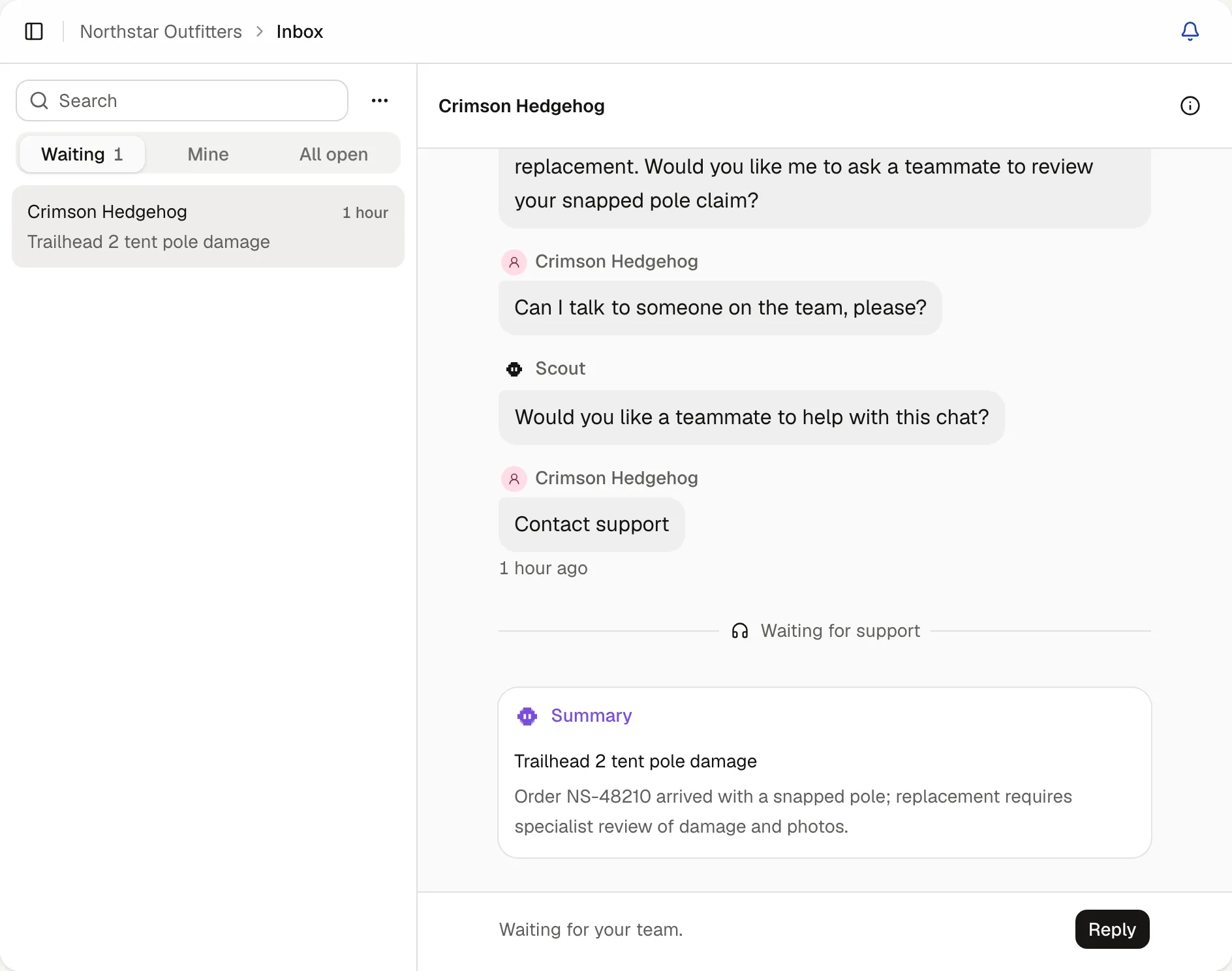
It answers the everyday questions. With passing chats turned on, customers can ask for your team, and the chat arrives in your inbox with a summary.
What it does
Passed chats wait under Waiting
Oldest first.Each comes with a summary
And a suggested first reply you can edit before you send it.Your phone tells you
Once you turn on alerts. On an iPhone, add Turbo Agent to your home screen first.Out of hours, it takes their email
And tells them when your team is back.
Set it up
- Open Pass to your team
- Turn on Pass unfinished chats to your inbox
- Set your support hours
Questions
Does someone have to be online?
No. Set your support hours. Outside them, it asks the customer for an email and tells them when you’ll be back in touch.
Can I answer from my phone?
Yes. The inbox works in your phone’s browser, and you can add Turbo Agent to your home screen.
Can several teammates answer chats?
Yes. Every plan has unlimited teammates. A chat belongs to whoever takes it, and shows under Mine.
What do customers see while waiting?
That they’re waiting for your team, with updates if the wait goes on.
Can I join an agent’s chat?
Yes. Open any chat, join it and reply. You can hand it back to the agent when you’re done.
How much does it cost?
From £39 a month. Every plan starts with 14 days free, and you don’t need a card to try it.