Your customers' data
Where chats are stored, how long they're kept, who can see them, and what to do when a customer asks for theirs.
Chats belong to your business. We store and use them only to run Turbo Agent for you, as our privacy policy and terms set out.
Where it's stored
Your workspace, chats, files and knowledge are stored in the European Union. The data your agent searches is stored in Ireland.
Each reply is written by an AI model, which may run outside the UK. Every request goes only to providers that have agreed not to train on it or keep it. The privacy policy names each provider.
How long chats are kept
| Chat | Ends after | Deleted |
|---|---|---|
| Answered only by your agent | A day without messages | 30 days after it ends |
| Passed to or joined by your team | 30 days without messages | 30 days after it ends |
A deleted chat goes with its messages, files and summary.
Who can see chats
The people in your workspace. To change who that is, see Add your team.
We open a workspace only when we need to, to help you or to keep Turbo Agent secure.
When a customer asks for their data
A customer can ask you to delete their chats, or for a copy of them. Find each chat in Inbox by their name, email or chat reference.
Delete a chat
An administrator can delete a chat. It goes for good, with its messages, files and summary, and can't be brought back.
Open the chat in Inbox.
Open the menu at the top of the chat (the three dots) and select Delete chat.
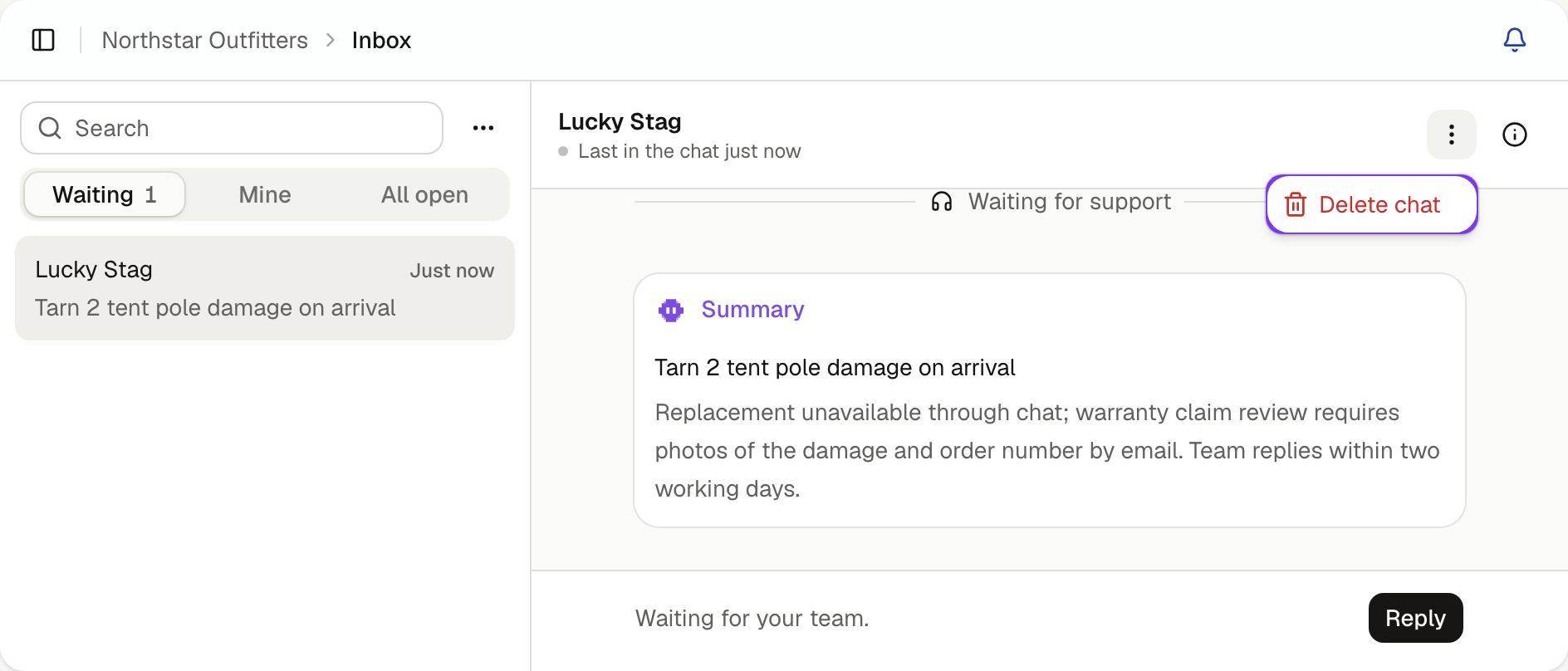
Select Delete chat again to confirm.
If the customer has the chat open on your website, they can start a new one.
A summary your agent already added to the customer's record in a connected service stays there. Delete it in that service too.
Send them a copy
Email us at support@turboagent.app with the chat reference. We send you a copy to pass on.
Closing your workspace
Email us at support@turboagent.app from an administrator's address. We delete your workspace with its chats, knowledge and settings. Ask in the same email if you'd like a copy of your content first.